
Quick summary — Most realtors wait on referrals and hope the phone rings. But google ads for real estate agents step by step puts you in control of when leads arrive. You decide how many buyers and sellers see your name each single day.
- Google Ads shows your name to buyers who actively search for homes right now.
- Search campaigns with local keywords give realtors the fastest path to leads.
- A budget of $500 to $800 per month is enough to start learning fast.
- Your landing page decides whether a click becomes a lead or a dead end.
- Most realtors see their first real leads within 7 to 14 days of launching.

Why Google Ads beats waiting for referrals and cold calls
Referrals feel great when they arrive. But you cannot turn them on when business slows. And cold calling burns hours to produce a handful of leads. Google ads for real estate agents step by step gives you a better path than both.
When a buyer types “homes for sale in [your city]” into Google, your ad appears at the top. That buyer is not casually browsing. They are ready to act right now. That intent is what separates Google Ads from every other paid channel you could choose.
On social media, you reach people who were not thinking about real estate. But on Google, you meet people who are already searching for their next home. Think with Google’s home buyer research found that 95% of buyers use online search in their home journey. Most start on Google—and while organic search rankings take time to build through SEO for real estate agents, search ads let your business appear at the top immediately.
And here is why that matters for your budget. You only pay when someone clicks your ad. No click means no cost. That makes google ads for real estate agents step by step one of the most efficient ways to spend your marketing money.
How to set up google ads for real estate agents step by step
Setting up your first campaign feels hard until you do it once—if you want a broader foundational walkthrough across service industries, review our Google Ads for local businesses beginners guide. After that, the whole process takes less than an hour. Go to ads.google.com and create your account. Then link your website and turn on conversion tracking before you write a single ad.
Conversion tracking tells Google what a win looks like for you. For realtors, a win is a form fill or a phone call from a potential buyer or seller. Without it, Google has no data to learn from. And without data, it cannot improve your results over time.
Picking the right campaign type before you spend a dollar
Start with a Search campaign. Search campaigns show your text ad to people who type specific keywords into Google. That search intent is your biggest edge as a realtor. A buyer who types that phrase is far closer to calling than someone who sees a banner ad while scrolling the news.
Avoid Performance Max campaigns until your account collects at least 30 conversions. That campaign type needs solid data to work well. Without a strong baseline, it burns budget fast and delivers unreliable results.
Writing ad headlines that home buyers actually stop and read
Your headline carries most of the weight. Write three headlines per ad and put your strongest message first. A good realtor headline names the location, the benefit and the next step. Try something like: “Homes for Sale in Austin, Talk to a Local Agent, Free Buyer Consultation.” Each part does a real job. Then add two description lines that back it up with your experience or a specific offer. Tight copy always beats long copy in Google Ads.

The best Google ad types for realtors and when each one works
Most realtors only know about search ads. But Google offers several formats and the best google ad types for realtors depend on what goal you want to hit right now.
Search ads work best for getting leads quickly. Someone searches, your ad appears and they click through to your page. That is the fastest path from your budget to a real conversation with a buyer.
Call-only ads work well in competitive markets where buyers want fast answers. The ad shows your phone number instead of a website link. One tap calls you directly. For realtors who close well on the phone, this format produces strong results.
Remarketing ads show your name to people who already visited your website but did not contact you. A buyer who spent five minutes browsing your listings is still warm. These ads bring them back at a low cost per click because the audience already knows who you are.
Local Services Ads sit above regular search results and show your name, rating and phone number. Google checks your business before approving you to run them. That verification badge builds trust fast and makes buyers far more likely to call.
How to generate real estate leads with Google Ads through sharp targeting
Good targeting is what separates a campaign that makes money from one that wastes it. How to generate real estate leads with google ads starts with reaching the right buyer at the right moment.
Start with keyword targeting. Build a list of specific local phrases. “Homes for sale in [your city]” and “real estate agent near me” both show strong buyer intent. Avoid broad keywords like “real estate” alone. They attract everyone, including people who have no plans to buy a home.
Add negative keywords to block searches that do not fit your business. “Real estate jobs,” “real estate school” and “how to get a real estate license” all waste budget. Put them in your campaign from day one before you spend a single dollar.
Location targeting lets you focus every dollar on the areas you actually serve. If you work in three zip codes, target only those. You pay for clicks from people you can genuinely help. Our Google Ads management service handles this setup for realtors who want results without the learning curve.
Also think about device targeting. Mobile clicks convert well during evenings and weekends. Desktop performs better on weekday mornings. Set bid adjustments to spend more when your best leads come online.

Real estate PPC budget guide: how much to spend and when to scale
Budget is the first question most realtors ask. The real estate ppc budget guide answer depends on your market. Competitive cities cost more per click. But smaller markets give you more leads for the same monthly spend.
A starting range of $500 to $800 per month gives you enough data to learn fast (if you are working with tighter capital, see our guide on how to generate real estate leads with a $500/month marketing budget). Set your daily budget and do not touch it for 30 full days. Google’s system needs time to find your ideal buyers. Changing bids too early resets that learning and wastes the spend you already put in.
Track your cost per lead every week. Search Engine Journal’s local PPC guide shows that real estate leads from Google Ads typically cost between $30 and $80 in most US markets. If your average commission runs $6,000, a $60 lead cost pays for itself many times over.
Scale up when you find a campaign that performs. Raise your budget by 20% every two weeks, not all at once. A slow increase lets Google adjust without hurting your results. Our lead generation service for realtors uses this exact approach to help agents grow without burning through their ad spend.
What your landing page must do to turn ad clicks into booked calls
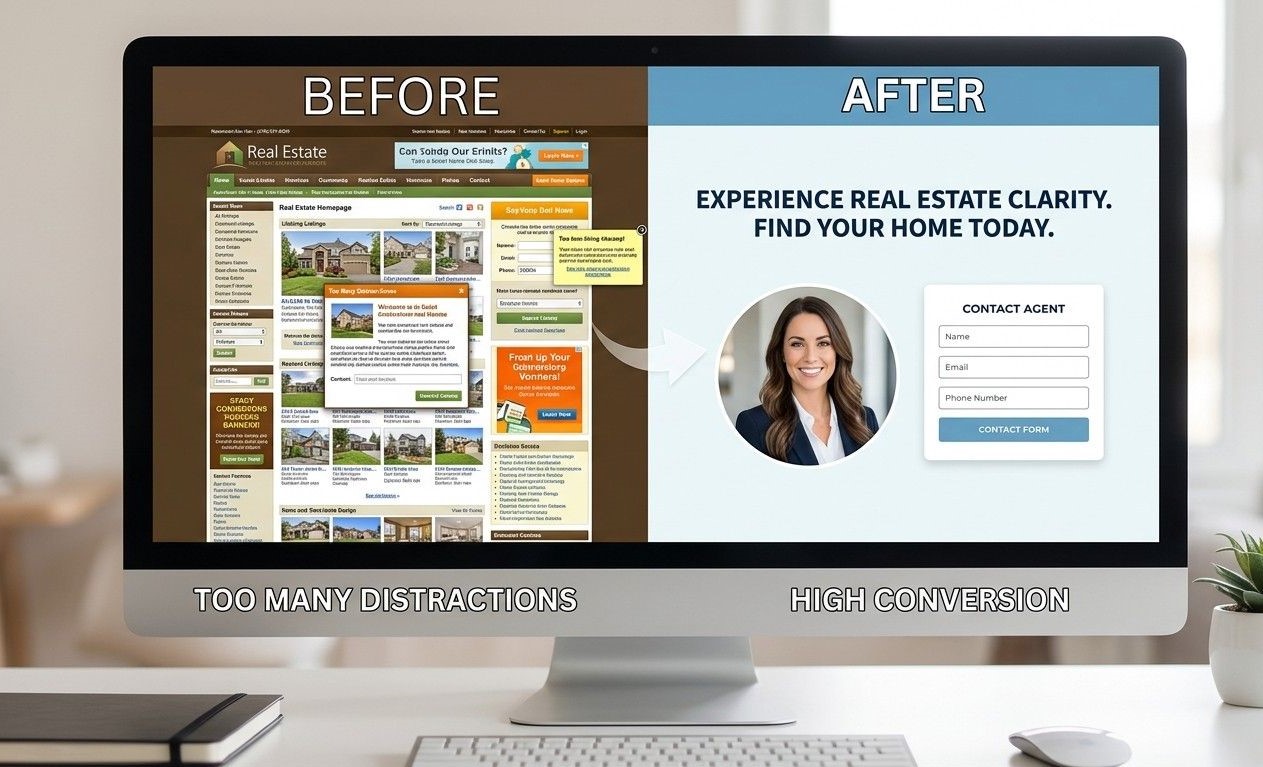
Your ad gets the click. But your landing page gets the lead. Most realtors send Google Ads traffic to their homepage and then wonder why nobody fills in a form.
A homepage has too many choices. The landing page has exactly one goal: get the visitor to call you or fill in a form. Remove your navigation menu. Take away every link that leads somewhere else. That single focus lifts your conversion rate fast.
Your landing page headline must match your ad headline exactly. If your ad says “Homes for Sale in Austin,” your page must say the same thing. A mismatch confuses the visitor and they leave. That wasted click costs you real money every time.
Add one trust signal above the fold. A professional photo, your years of experience and a Google review count all build buyer confidence in seconds. Keep your form short: name, email and phone number only. A clean page with those elements converts far better than any full homepage ever will.
You can also pair your Google Ads with a strong social presence. Our post on social media marketing ideas for real estate agents shows how both channels work together to build your lead pipeline.
Google ads for real estate agents step by step is not as complicated as it looks. Pick one section from this post and act on it today. And if you want a team to build and manage your campaigns from day one, talk to us here.
Frequently Asked Questions
Q: How much do Google Ads cost for real estate agents?
Most realtors start with $500 to $800 per month. Competitive cities like New York or Los Angeles push that to $1,500 to $3,000 because more agents bid on the same keywords. Your actual cost depends on your target area, your keyword list and how well your landing page converts clicks. Start small, track the data and scale the campaigns that perform.
Q: What is the best Google Ads strategy for realtors?
Start with a Search campaign targeting buyer-intent keywords in your specific area. Use tight location targeting, add negative keywords on day one and send all traffic to a dedicated landing page. Track every form fill and phone call as a conversion. Give the campaign 30 days before making changes. That patience is what separates agents who build real lead pipelines from those who quit too soon.
Q: Do Google Ads work better than Facebook Ads for real estate?
Google Ads targets buyers who search for homes right now. Facebook reaches people who might think about buying later. For realtors who want fast results, google ads for real estate agents step by step gets leads quicker than any social platform. Facebook works better for long-term brand awareness. Many top agents run both and use Google Ads for immediate leads and Facebook to stay visible in between.
Q: How do I target home buyers with Google Ads?
Use keywords that show buying intent. Phrases like “homes for sale in [city]” and “real estate agent near me” attract buyers ready to act. Set your location to your exact service area only. Add negative keywords to filter out renters and people searching for real estate careers. Adjust your bids by device and time of day to spend more when your best buyers come online and search.
Q: What landing page should a realtor use for Google Ads?
Build a single-focus page with one goal: a call or a form fill. Remove your navigation menu completely. Match the headline word for word to your ad copy. Add a professional photo, your years of experience and two or three Google reviews above the fold. Keep the form to three fields: name, email and phone. A clean page like that converts far better than a full website page every single time.
Q: How long until Google Ads generate real estate leads?
Most realtors see their first leads within 7 to 14 days of launching. The first 30 days produce data more than leads. Google uses that data to find the right buyers for your specific ads. By day 45 to 60, a well-built campaign typically hits a steady cost per lead. Give it that full window before you judge the results. Patience in those early weeks protects your budget and your long-term returns.
Q: What is a good cost per lead for real estate Google Ads?
A cost per lead between $30 and $80 works well for most US markets. If your average commission runs $5,000 to $10,000, even a $150 lead pays for itself fast. Track cost per lead each week and compare it to your close rate. The goal is a strong return on your spend, not the cheapest possible lead cost. Our real estate marketing team builds campaigns with that return in mind from the very first day.


![A close-up, photorealistic shot, from an over-the-shoulder perspective, of a hand holding a modern smartphone in a bright, local neighborhood cafe. The screen is sharply focused, displaying a Google Business Profile for "Sarah Johnson, [Your City Name] Realtor." The profile is complete with a smiling professional headshot, five large gold stars indicating a top rating, and a clear "Local Expert" verification badge. Subtle natural daylight filters in from a large window to the side, highlighting the hand and phone screen. Shallow depth of field blurs the cafe background (wooden tables, plants) into soft bokeh. The overall feel is warm, authentic, and focused.](https://adnnel.com/wp-content/uploads/2026/05/1-7-768x448.jpeg)